
Your CRM does almost everything. Except that one thing.
You picked a CRM, moved your contacts in, and trained your team. For the most part, it works. Then you hit the wall: the one thing your business needs that it just won’t do.
Maybe it won’t talk to your phone system. Maybe your team copies the same data into a spreadsheet every Friday. Maybe someone keeps asking whether you could run projects out of it too.
So you start searching. “Can my CRM do this?” “How do I get it to do that?” And eventually, “Do I need something custom?”
I’ve been on both sides of this question. Before I worked in software, I ran a field services company and was the business owner wrestling with tools that didn’t quite fit. Now I help businesses decide what to build, and what not to. The honest answer to “do I need something custom?” is often no. Sometimes it’s yes. This guide will help you tell the difference before you spend money on the wrong answer.
What is a CRM integration?
A CRM integration is a connection that lets your CRM share information with another system automatically, so nobody has to copy it by hand.
Some common CRM integration examples:
- A call on your phone system is logged on the right contact’s record automatically.
- A form on your website creates a new lead in your CRM, already tagged with where it came from.
- When a deal closes, an invoice is created in your accounting software.
- A customer’s WhatsApp or text messages show up in their CRM history.
- Your CRM and another team’s CRM keep the same contacts in sync.
These connections come in three flavors. Some are built in by the CRM vendor. Some are add-ons from a marketplace or a connector tool like Zapier or n8n. And some are custom, built specifically for your business using the CRM’s API, which is the doorway that lets outside software read and write your CRM data.
Most businesses never need the third kind. The trick is knowing when you do.
Four ways to get your CRM to do something, cheapest first
When your CRM won’t do what you need, work up this ladder one rung at a time. Most problems are solved before you reach the top.
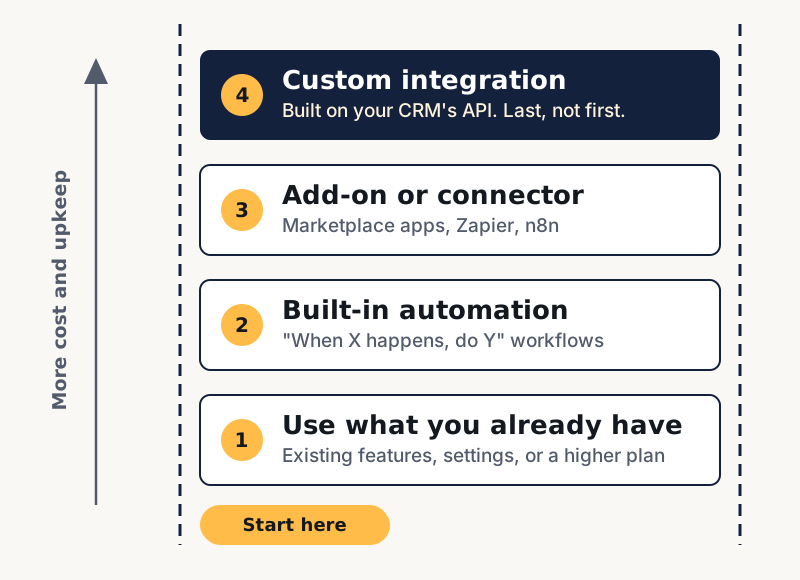
- It’s already there and you’re not using it. Modern CRMs do far more than most teams realize. Searches like “can Salesforce send automated emails” and “can Salesforce automatically send reports” are common, and the answer to both is yes. Before anything else, check the documentation, ask the vendor’s support team, or search the vendor’s community forum. Also check whether the feature exists on a higher plan. Sometimes “my CRM can’t do this” really means “my plan doesn’t include this,” and upgrading costs less than building.
- Built-in automation can handle it. Most CRMs include workflow tools: when this happens, do that. Send a follow-up three days after a quote. Assign new leads by region. Alert a manager when a big deal stalls. If your need can be described as “when X, then Y,” try this rung before anything else.
- An add-on or connector tool bridges the gap. If you need your CRM to talk to another app, there’s a good chance someone has already built that bridge. Check your CRM’s marketplace first. If there’s nothing there, tools like Zapier or n8n can connect thousands of apps without custom code. This is often the right answer for simple, one-direction flows: a form creates a lead, a closed deal creates an invoice.
- A custom integration, built for your business. When the first three rungs genuinely can’t do the job, a developer builds a connection or a tool using your CRM’s API. This is the most flexible option, and the most expensive one to build and to maintain. It should be the last rung, not the first.
Here’s what that can look like. Picture a 12-person service company where the office manager spends every Friday afternoon emailing each salesperson a list of their open quotes. The owner asks a developer about building a custom weekly report. A closer look shows the CRM already supports scheduled reports filtered by owner. Twenty minutes of setup replaces the whole project.
Signs you don’t need anything custom
You probably don’t need a custom integration if:
- Other businesses obviously have the same problem. If thousands of companies use your CRM, someone has almost certainly solved this already. Search the vendor’s community forum before you assume you’re the first.
- The workaround takes minutes, not hours. A two-minute manual step once a week isn’t worth a project that costs thousands to build and maintain.
- It’s about how information looks, not how work flows. Wanting a different dashboard or report is usually a configuration problem, not a software problem. Most CRMs let you build custom reports and dashboards without exporting everything to Excel.
- It’s a one-way, simple handoff. “When this happens in app A, create that in app B” is exactly what connector tools are built for.
- A higher plan includes it. Compare the cost of an upgrade against the cost of building and maintaining something yourself. The upgrade often wins.
There’s no shame in landing here. The best outcome is solving the problem for the least money and the least ongoing upkeep.
Signs a custom CRM integration is the right call
On the other hand, it may be time for something custom if:
- Your team spends hours a week on workarounds. Copying data between systems, reconciling spreadsheets, re-entering the same information twice. Add up those hours across your team and multiply by what they cost. That number is your real budget for fixing it.
- Data has to flow both ways between systems that don’t talk. Simple connectors handle “A creates B” well. They struggle when two systems need to stay in sync, resolve conflicts, or handle business rules along the way.
- You’re stretching the CRM into something it isn’t. Searches like “can Salesforce be used for project management” or “can Salesforce be used as an ERP” usually come from teams pushing a CRM past what it was designed for. Sometimes that works. Often it means a separate tool, or a custom one connected to your CRM, would serve you better.
- Your process is part of your competitive edge. If the way you handle customers is what sets you apart, forcing it into a generic tool can mean giving that edge up.
- Add-ons are stacking up. Five connector workflows held together with filters and delays can become more fragile, and more expensive, than one well-built integration.
Now picture a distributor whose sales team quotes in the CRM, while pricing, inventory and order status live in a separate warehouse system. Reps check both screens on every call, and orders get re-typed by hand. The warehouse system has an API but no ready-made connector, and the data needs to flow both ways with pricing rules applied. That’s a genuine case for a custom integration.
Why “just build it” is riskier than it looks
Here’s the good news: custom software is cheaper and faster to build than it used to be. AI tools let a developer, or even a motivated business owner, produce working code in a fraction of the time it once took.
Here’s the catch: code that works isn’t the same as code that’s safe. When Georgetown University’s Center for Security and Emerging Technology tested code from five AI models, nearly half of the outputs contained bugs that could potentially be exploited (CSET, 2024). A 2026 test of more than 150 AI models by the security firm Veracode found the same pattern: only about 55% of the code passed basic security tests, even though more than 95% of it was free of syntax errors (Veracode, 2026).
Code that works isn’t the same as code that’s safe.
The bigger problem is confidence. In a Stanford University study, people who used an AI assistant wrote less secure code than people who didn’t, and were more likely to believe their code was secure (Stanford). The code looks right, so nobody looks closely.
That matters more for a CRM integration than almost anything else, because your CRM holds your customers’ names, contact details, purchase history and conversations. An integration with too much access, stored passwords in the wrong place, or no plan for what happens when one system goes down can quietly put all of that at risk.
So the question isn’t just “can I build it?” anymore. It’s “can I build it safely, and who will make sure it keeps working?” Use AI to move fast. Just make sure someone with real experience reviews what gets built before it touches your customer data.
Frequently asked questions
Can my CRM integrate with my phone system?
Often, yes. Many phone systems offer ready-made connectors for popular CRMs. Check both vendors' integration lists first. Custom work makes sense when you need calls handled in a specific way the connector doesn't support.
Can my CRM send automated emails or reports?
Almost certainly. This is core functionality in most modern CRMs, though some features may depend on your plan.
Can I use my CRM for project management?
You can, to a point. If you're bending the CRM into a project tool, it's worth comparing that against a dedicated project management tool connected to your CRM.
Can I connect my CRM to AI tools?
Increasingly, yes. Many CRMs now include AI features, and connections to outside AI tools are becoming common. Because these tools can read your customer data, this is exactly where an expert review pays for itself.
Is Zapier (or n8n) enough, or do I need a custom integration?
For simple, one-direction handoffs, connector tools are often enough and much cheaper. When you need two-way syncing, complex business rules, or high reliability, a custom integration is usually the better long-term choice.
How much does a custom CRM integration cost?
It depends on the systems involved, how data needs to flow, and how much ongoing maintenance it requires. That's why the first step should always be figuring out whether you need one at all.
Not sure which rung you’re on?
That’s normal. From the inside, a configuration problem and a real software gap can look exactly the same.
This is the kind of question I help business owners answer. In a short call, I’ll look at what you’re trying to do and tell you honestly which rung it belongs on, including when the answer is a setting you already have or an add-on that costs a few dollars a month. If it does need something custom, you’ll know why, and what doing it safely looks like.