Your team is already using AI
If you run a business, someone on your team has probably asked ChatGPT for help this week. Maybe to draft an email, summarize a contract, or clean up a spreadsheet. Maybe on a company account. Maybe on a personal one.
That’s not a guess. Gallup tracks this every quarter: about half of U.S. employees now use AI at work at least occasionally, and roughly three in ten use it a few times a week or more. Only about one in four say their employer has communicated a clear plan for it (Gallup). In a University of Melbourne study run with the consulting firm KPMG, half of U.S. workers said they use AI tools at work without knowing whether it’s allowed (KPMG, 2025).
None of that means your team is doing something wrong. It means a useful tool arrived faster than anyone could write rules for it. And it keeps changing faster than anyone running a business has time to follow.
Keeping up with AI is part of my job, and honestly, it’s also something I enjoy following. So it’s the question I’d put to any owner: is anyone in your business keeping up with AI? Not using it. Keeping up with it.
Why keeping up is harder than it looks
Most technology settles down after a few years. AI hasn’t yet. Stanford’s 2026 AI Index found that the share of organizations using AI jumped from 55% in 2023 to 88% in 2025. It also found the top AI models from several different companies scoring within a few points of each other on a widely used public leaderboard (Stanford HAI, 2026). In plain terms: there is no permanent winner. The best tool for a job this spring may not be the best one this fall.
Here’s a better illustration of the pace. In 2025, the nonprofit research group METR ran a careful study of experienced software developers. With AI tools, they took 19% longer to finish real tasks, even though they believed AI had made them about 20% faster (METR, 2025). By early 2026, METR itself flagged those results as out of date, and said developers were likely getting more help from the newer tools (METR, 2026).
Careful researchers couldn’t keep a finding current for a full year. A busy owner reading AI headlines between meetings can’t be expected to do better, and shouldn’t have to.
The two risks when nobody owns AI
Risk one: AI with nobody watching. In 2023, Samsung found three cases where engineers had pasted sensitive information, including meeting notes and source code, into ChatGPT for work. The company’s first response was to ban the tools (Korea Herald via Asia News Network). It’s not a rare pattern. In the Melbourne and KPMG study, 46% of U.S. workers admitted uploading sensitive company information to public AI platforms, and 58% said they rely on AI output without properly checking it (KPMG, 2025).
The same goes for anything AI builds. When Georgetown’s Center for Security and Emerging Technology tested code from five AI models, nearly half of it contained bugs that could potentially be exploited (CSET, 2024). AI-written work looks finished, so it’s easy to skip the review.
Risk two: falling behind. Banning AI trades one risk for the other. In a 2026 survey of owners in Goldman Sachs’ small-business program, 76% said they use AI, but only 14% are fully integrating it into core operations. Among those using it, 49% cited a lack of technical expertise and 48% said choosing the right tools was hard (Goldman Sachs, 2026). That gap between trying AI and using it well is where competitors either pull ahead or don’t.
Is ChatGPT safe for business use?
It can be. Whether it is depends mostly on two things: which account your team uses, and what they put into it.
The account matters more than most people realize. OpenAI, which makes ChatGPT, says conversations on individual accounts can be used to train its models unless the user opts out. Its business plans, like ChatGPT Business and Enterprise, are not used for training by default (OpenAI). So the same tool can handle your data differently depending on whose account it’s on. Other AI vendors draw their own lines, and those terms change, so check the current ones for any tool your team uses.
“Safe” also means the answer is right. The U.S. National Institute of Standards and Technology (NIST) calls it confabulation when an AI confidently states something false, what most people call a hallucination (NIST, 2024). An AI tool can keep your data private and still give you a wrong number in a polished paragraph.
The practical answer: use a business account, keep sensitive data out unless you’ve confirmed the terms, and have someone check anything that matters before it goes out.
What should an AI policy include?
A small business doesn’t need a 20-page document. Call it a policy or call it AI guidelines for employees. What matters is that it’s written down, shared, and owned. It should answer four questions:
- Which tools are approved? Name them, and the plan or account type. NIST’s guidance on generative AI recommends keeping an approved list of AI providers for exactly this reason (NIST, 2024).
- What data never goes in? Customer personal information, financials, passwords, contracts, and anything you’d be uncomfortable seeing in someone else’s chat history.
- Who reviews AI-made work? Anything that reaches a customer, or touches customer data, gets a human check first. The U.S. Small Business Administration gives the same advice: when you use free AI tools, have another person review what they produce (SBA).
- Who keeps it current? One named person, and a date for the next review.
The SBA also suggests talking to your attorney, if you have one, about the laws that apply where you operate. That’s worth doing, especially if you serve customers in states with their own AI or privacy rules.
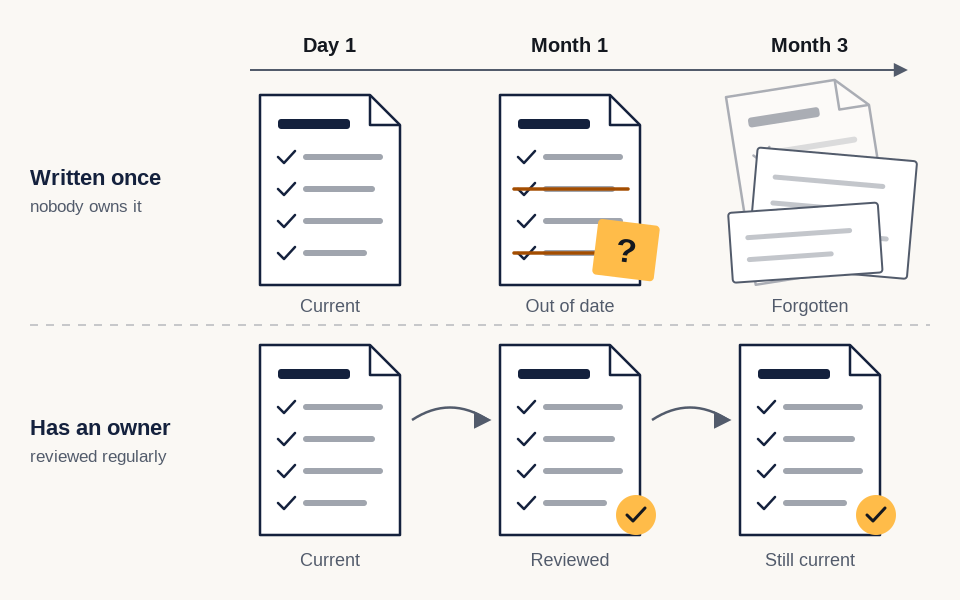
The fourth question is the one most policies skip, and it’s the reason most of them fail. A policy written in January names tools that may have changed by spring. Without an owner, it goes out of date in weeks and is forgotten in months.
How to choose the right AI tools for your business
Demos are built to impress. Your work isn’t a demo. Remember the METR developers who felt 20% faster while actually working slower: how a tool feels is not evidence. NIST makes the same point for organizations, warning against judging AI from narrow, anecdotal tests and recommending evaluation in real-world conditions (NIST, 2024).
A simple way to test a tool on your own work:
- Pick three to five real tasks the tool claims to help with, ones your team does every week.
- Do them both ways, with the tool and without it, and time each.
- Count the fixes, not just the time. Minutes saved don’t help if someone spends an hour correcting the output.
- Check the data terms for the plan you’d actually buy.
- Decide, and write the result into your policy, whether it’s yes, no, or “not yet.”
Picture a 15-person insurance agency trying an AI tool that drafts renewal letters. The demo looks great. On the agency’s own files, the drafts come out fast, but some have the wrong coverage limits or renewal dates, so someone still has to check every letter. That’s not a failed test. It’s exactly what a test is for, and it costs a week instead of a year.
How to keep up with AI without it becoming your job
Keeping up isn’t reading every headline. It’s a small, repeating loop: notice what’s changed, test what looks useful, decide, and update your policy. There are three realistic ways to make sure that loop actually runs.
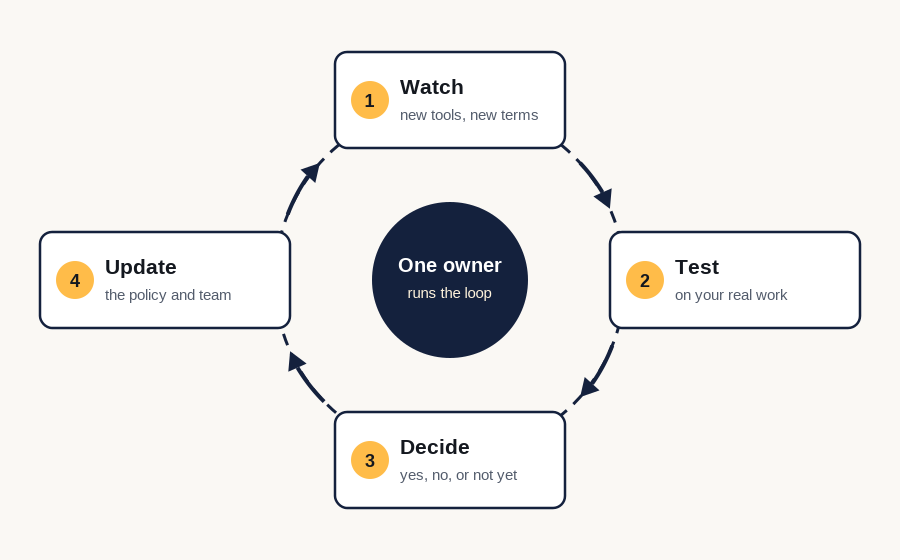
Give it to someone inside. If a team member is curious about AI and has a few hours a month, make it officially theirs. Give them the four questions above and a standing slot to report back. This works well when the person has real time for it, not just enthusiasm.
Put it on the calendar. At minimum, review your AI tools and policy every quarter, and any time you add a tool or a vendor changes its terms. A scheduled review won’t catch everything, but it stops the policy from quietly expiring.
Bring in outside help. Most owners already know the idea of a fractional CFO: senior financial judgment, a few hours a month, without a full-time salary. A fractional CTO is the same idea for technology. Part of the job is doing this loop for you: keeping up, testing what looks promising against your real work, and bringing back clear recommendations.
If you go that route, look for someone vendor-neutral. An advisor who earns a commission on one product isn’t keeping up for you. They’re selling to you.
Frequently asked questions
Is ChatGPT safe for company data?
It depends on the account. Business plans generally handle data more strictly than personal accounts, but check the current terms for the plan you use. Either way, keep passwords, financials and customer personal information out unless you've confirmed how they're handled.
What's the difference between AI guidelines and an AI policy?
For most small businesses, nothing that matters. Use whichever word fits your company. What counts is that the rules are written down, shared with the team, and owned by someone.
Do small businesses need an AI policy?
If anyone uses AI for work, yes. One page covering approved tools, off-limits data, review, and ownership is enough to start.
How often should an AI policy be updated?
I'd review it at least every quarter, and whenever you add a new tool or a vendor changes its terms.
Can employees use personal ChatGPT accounts for work?
Not for company or customer information. If people find AI useful, the better fix is giving them an approved business account, not banning it.
Do I need an AI consultant or advisor?
Not always. If someone on your team has the time and interest to own the loop above, start there. Outside help makes sense when nobody does, or when you're making a bigger decision and want an independent view.
Not sure who’s keeping up in your business?
That’s the most common answer, and it’s a fine place to start.
In a short call, I’ll look at how your team uses AI today and tell you honestly what’s worth keeping, what’s worth fixing, and what can wait. If you want more than a call, a Systems Check is a fixed-price way to start: a hands-on look at the tools your business runs on, ending in a written report and a fix list.
Book a free discovery call